Every page of the 7x customer console, in the order of one customer's journey: from finding a plan to a live site, billing and support.
Follow one customer, the demo account Demo Bakery, through the whole of Katalyst. Every screenshot is the live console with invented demo data only; the numbered highlights point at the controls the step talks about. Part of Visual Introduction to 7x Exponential Katalyst.
Note
Steps that would move real money or create a real server (paying, and the Plesk control panel itself) are shown in their demo state. The captions say so.
Registering a domain, choose Put it on a host you already have, or I own it already: just add it to the host. A new site gets its domain with its hosting.
Registering a domain: put it on a host you already have, or, for a domain you own, just add it to the host.
New customers create an account; everyone signs in with user name and password, or a passkey, and can add a second step. See Sign in and Two-step sign-in.
The sign-in form: e-mail or user name, password, keep me signed in, and the forgot password link.Setting up two-step sign-in: choose the authenticator app, scan the code, type the code it shows, and save.
Orders shows each order and how far its set-up is. Within the hour the hosting is created and Exponential is installed; you get an e-mail when it is live.
Orders: what the account ordered, with its set-up progress, and Ask for a quote.
Hosts has one card per hosting account, with its verified backup and buttons for everything you do with it; open Names, add-ons and backups for the rest. See The Hosts page.
A host card on the Hosts page: its status, plan, renewal and verified backup, and buttons for everything you do with it.A host card opened: its names with Disable, Enable and Remove, its add-ons and renewal, and its backups.
The Overview tab of a site: address, status, plan, server, storage and renewal at a glance.The Settings tab of a site: plan change, renewal, and the site settings.
The same tab holds the site settings you change yourself: the PHP version, maintenance mode and redirects. A 7x house account shows its billing cycle as No charge (7x account).
PHP version: the current and the recommended version, and a warning for versions too old for the site.Maintenance mode on: the message for visitors and a 12-hour preview link.Redirects: the whole domain (www, https) and single pages, 301 or 302.The Logs tab of a site: ask the 7x team for a log.
Open control panel (Plesk) signs you in to Plesk in one click; Admin sign-in opens your site's editor. The demo host has no real Plesk account, so the screenshot stops at the button. See Sign in to Plesk.
A host card: Open control panel signs you in to Plesk in one click; Admin (edit.) opens your site editor.
Choosing the host on the Add a domain page: each host shows how many domains, aliases and subdomains it uses of its plan.Add a domain to a host: choose the host, what to add and the name, check it, then add it at no charge within your plan.The names of a host with their kind, state, SSL and DNS, and Disable, Enable and Remove for each.
Domains lists every name; a domain's page has its registration, renewal and DNS. See Manage a domain, DNS choice and SSL.
The Domains page lists your domains with their status, expiry date and auto-renew.A domain page: registration facts, the transfer buttons, the renewal and where the DNS of the domain lives.Where your DNS lives: your own name servers or Cloudflare, the registrar DNS, or 7x DNS, then Save DNS choice.The Domains tab of a site lists its names and shows its SSL certificate and DNS.
Captured every hour and night; Backup verified shows that the off-site copies were checked against the site. Restorable and downloadable. See Backups, Restore, Versions.
The Backups card shows the last hourly and nightly capture and what is kept, with a copy off the server.The Restore card on the Backups tab: choose a restore point, choose what to restore, then click Request a restore.The Versions tab of a site: request a restore point now, and see the history of saved versions.The Versions page: each site with its version control state, Exponential version and available updates.
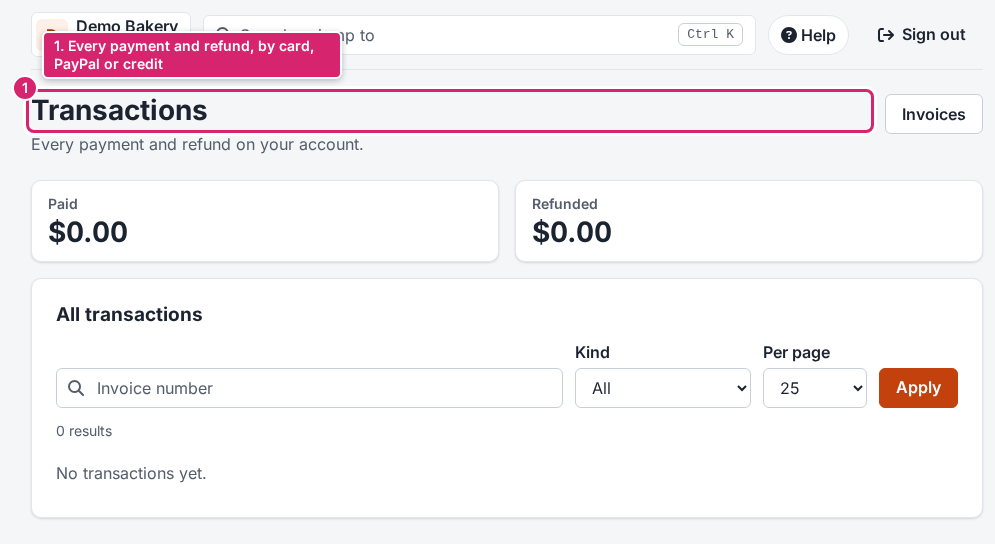
The Billing page: open invoices with Pay now, recent invoices, upcoming charges and your payment methods.The Invoices page: every invoice with filters, Pay on open ones, View, PDF and Receipt, and a ZIP download.The Payment methods card: add a card, or save your PayPal account for renewals.Prepay and account credit: add money to your account; new invoices are paid from it first.Transactions: every payment and refund of the account.The Renewal card of a site: when it renews and for how much, and the option to cancel at the end of the period.
A site in its free trial: the trial notice with Add a payment method and Cancel trial.A service page: its price and renewal, and the Request a cancellation section at the bottom.
Ask for a quote for custom work, and hand hosting over to another 7x customer. See Orders and quotes and Transfers.
Ask for a quote: choose from 96 services in ten groups, add budget, timeline and the site, and send it.Transfers: hand a host, domain or service over to another 7x customer, who accepts or declines.
Tickets, about a site in one click, answered in the console and by e-mail. See Open a support ticket.
Support tickets: your tickets with their state, and New ticket.A new support ticket: subject, category, priority, the site it is about, your message and attachments.One ticket: your message, the 7x answer, and the reply form.
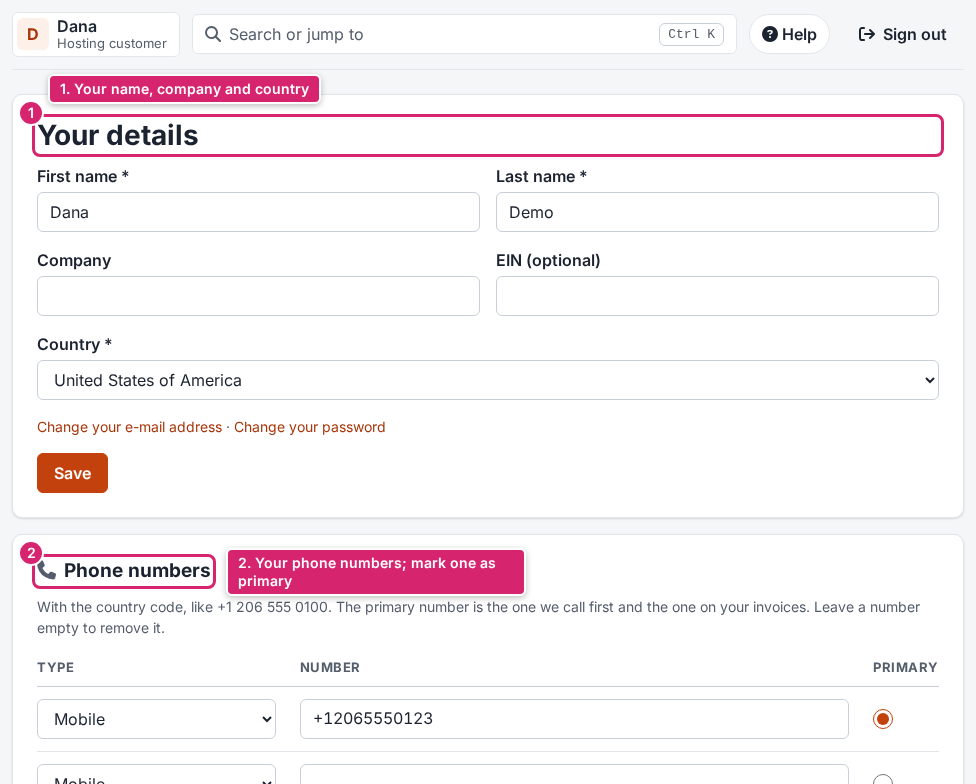
Your details: name, company and country, and your phone numbers.The Security page: two-step sign-in, e-mail address, password, passkeys and sessions.Inviting a user: enter their e-mail address, tick the permissions they need, and send the invitation.